bgrun


Run long-running background tasks easily. Perfect for development servers, test suites, and AI agent automation loops.
bgrun manages your background tasks so you can keep working without terminal lockups. Start servers, track their readiness, tail logs, and shut them down; all over an automatic background daemon using structured JSON payloads.
Install
# Quick install (Linux)
curl -fsSL https://bethropolis.github.io/bgrun/install.sh | sh

# AUR (Arch Linux)
yay -S bgrun-bin

# Homebrew (Linux)
brew tap bethropolis/tap && brew install --cask bethropolis/tap/bgrun

# From source
./install.sh   # requires Rust toolchain
Quick start
1. Run a Process
Launch a process in the background and tell bgrun exactly when it is ready to handle traffic:
bgrun run --name dev-server --ready-when-port 3000 "npm run dev"
2. Coordinate Your Workflow
Block execution only until the server is actually ready, inspect its logs, or terminate it cleanly:
# Block until ready (not a must!)
bgrun wait dev-server --timeout 30s

# Check on-demand logs
bgrun tail dev-server --lines 10

# Clean up
bgrun kill dev-server
Commands
| Command | Purpose |
|---|---|
bgrun run [flags] <cmd...> | Start a background job |
bgrun list [--workspace <ws>] | List all jobs |
bgrun status <id> | Get job state |
bgrun wait <id> --timeout <d> | Block until ready |
bgrun tail <id> [--digest] [--level <l>] | Show logs |
bgrun diff <id> | New log lines since last call |
bgrun send <id> <data> | Write to stdin |
bgrun stats <id> | Show CPU/RSS/uptime |
bgrun kill <id> [--workspace <ws>] | Terminate job(s) |
bgrun attach <id> | Attach to PTY job interactively |
bgrun expect <id> <pattern> | Wait for log line matching pattern |
bgrun schema <command> | Print JSON Schema for command args |
bgrun run-group <name> [name...] | Start multiple named jobs in parallel |
bgrun screen <id> [--lines N] | Show last N lines from in-memory ring buffer |
bgrun clean [--workspace <ws>] | Remove all terminated jobs |
bgrun skill install <dir> | Install embedded skill bundle |
Docs
Crate layout
| Crate | Role |
|---|---|
bgrun-proto | Shared types, no I/O |
bgrun-core | Job state machine, config parser |
bgrun-daemon | Spawns/monitors/kills processes, serves CLI |
bgrun-cli | User-facing CLI |
License
MIT
Architecture
bgrun is split into 4 crates with a strict dependency graph. The daemon and CLI never link directly — they communicate over a Unix socket using a plain-text NDJSON protocol.
Crate layout
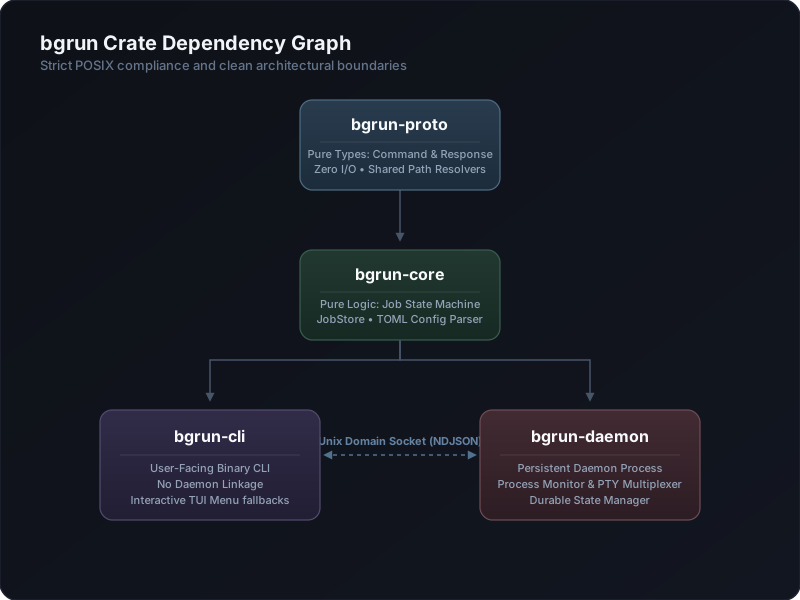
bgrun-proto— zero I/O. Types only. Any crate can depend on it.bgrun-core— zero I/O. Pure logic and data structures. Depends only onbgrun-proto.bgrun-cli— depends onbgrun-proto+bgrun-core. Talks to daemon over Unix socket.bgrun-daemon— depends onbgrun-proto+bgrun-core. Full daemon with tokio, nix, tracing.
The CLI never imports bgrun-daemon. Path utilities (socket_path, state_dir) are in bgrun-proto::paths so both crates share them without coupling.
Daemon lifecycle
Startup
- The CLI detects whether the daemon socket exists.
- If missing, it spawns
bgrun-daemonas a child process (no arguments). - The daemon process forks itself:
- The parent exits immediately, returning control to the CLI.
- The child continues as the actual daemon.
- The child calls
setsid()to create a new session and detach from the terminal. BGRUN_DAEMONIZED=1is set to prevent recursive double-fork.
Socket setup
The daemon binds a Unix domain socket at $XDG_RUNTIME_DIR/bgrun/daemon.sock (or /tmp/bgrun-$UID/daemon.sock as fallback). It listens in a tokio accept loop, spawning a new task per connection.
Orphan re-adoption
On startup, the daemon reads all persisted jobs from $XDG_DATA_DIR/bgrun/jobs/$ID/:
- If PID is alive (
kill(pid, 0)succeeds): the job is re-inserted into the in-memory store and a background task monitors it every 2 seconds. - If PID is dead: the job is marked
Crashedin status.json.
This ensures no monitoring gap after a daemon restart.
Shutdown
The daemon runs until killed (pkill bgrun-daemon) or an idle timeout expires. On restart via the CLI, the new instance re-adopts orphaned children as described above.
Reactive idle auto-shutdown
The daemon spawns a background monitor that uses tokio::sync::Notify for zero-CPU idle polling:
- A global
LIFECYCLE_NOTIFYstatic is defined inrunner.rs. - Every job spawn (
spawn_job,spawn_pty_job) and job exit (handle_job_exit) calls.notify_one(). - The monitor loop:
- Active jobs > 0: parks indefinitely on
.notified().await— 0 CPU usage. - Active jobs = 0: races
.notified()againstBGRUN_IDLE_TIMEOUT(default 60s).
- Active jobs > 0: parks indefinitely on
- On timeout expiry, the socket file is deleted and the process exits.
This replaces any periodic polling approach, ensuring the daemon consumes no CPU while idle.
Protocol
The CLI and daemon communicate over a Unix socket using NDJSON (Newline-Delimited JSON).
Request
{"id":"req-uuid","command":"Run","args":{"cmd":["sleep","300"],"name":"sleeper",...}}
One JSON object per line. The command field uses tagged enum serialization (serde’s #[serde(tag = "command", content = "args")]) so all commands share the same outer envelope.
Response
{"id":"req-uuid","ok":true,"data":{"id":"abc123","state":"running",...}}
{"id":"req-uuid","ok":false,"error":"job not found"}
Every request gets exactly one response line. The response format is:
req_id— matches the request’sidok— boolean success indicatordata— command-specific payload (only whenokis true)error— error message string (only whenokis false)
Commands
| Command | Request args | Response data |
|---|---|---|
Run | RunArgs { cmd, name, workspace, readiness, restart, pty, max_runtime_ms, max_rss_mb, env, after, cwd, pty_cols, pty_rows } | JobRecord |
RunGroup | { jobs: Vec<RunArgs> } | Vec<JobRecord> |
Status | { id } | JobStatus |
List | { workspace? } | Vec<JobRecord> |
Kill | { id?, workspace? } | { killed: Vec<String> } |
Tail | { id, lines, digest, level?, strip_ansi } | { lines: Vec<LogLine> } or LogDigest |
Diff | { id, lines?, strip_ansi } | { cursor: u64, lines: Vec<LogLine> } |
Wait | { id, timeout_ms } | WaitResult { ready: bool, elapsed_ms: u64 } |
Send | { id, data } | { ok: true } |
Stats | { id } | ResourceStats { cpu_pct, rss_mb, uptime_secs } |
Attach | { id } | hijacks socket for raw byte streaming |
Expect | { id, pattern, is_regex, timeout_ms } | { matched: bool, line_number, content } |
ResizePty | { id, cols, rows } | { resized: true } |
Process lifecycle
Spawn (runner.rs)
- Idempotency check: if a named job already exists and is alive, return its record.
- Dependency wait: if
afteris set, poll the store until the named job reachesReady,Exited,Crashed, orKilled(120s timeout). - Spawn:
tokio::process::Commandwith piped stdin/stdout/stderr, process group 0. - Output capture: stdout and stderr are piped to async tasks that write to
stdout.logwith log rotation at 50MB. - Stdin handle: stored in a global
HashMap<String, ChildStdin>keyed by job ID. - Ready check: if
readinessis set, spawn a background task that polls every 200ms up to 60s. - Max runtime: if
max_runtime_msis set, a tokio sleep task fires after the duration, killing the job if still alive. - Memory limit: if
max_rss_mbis set, a background task polls RSS every 1s and kills the job if exceeded. - Lifecycle notify:
LIFECYCLE_NOTIFY.notify_one()is called to wake the auto-shutdown monitor. - Persist: write
meta.json(fullJobRecord) andstatus.jsonto disk.
Monitor
After spawn, the daemon spawns monitor_job() which:
- Awaits the child process exit.
- Determines exit type (SIGKILL → Crashed, non-zero exit → Crashed, zero exit → Exited).
- If
restart = OnCrashand the process crashed, spawns a new instance afterbackoff_msdelay. - Writes status.json.
Kill
- Send
SIGTERMto the process group (killpg). - Wait up to 5 seconds.
- If still alive, send
SIGKILLto the process group. - Transition state to
Killed.
Readiness system
Four checker implementations, all implementing the ReadinessChecker async trait:
| Strategy | Checker | Mechanism |
|---|---|---|
LogPattern("string") | LogPatternChecker | Reads the log file from last offset, searches for substring. Offset-tracked to avoid re-scanning. |
TcpPort(3000) | TcpPortChecker | TcpStream::connect("127.0.0.1:3000") |
HttpPoll("http://...") | HttpPollChecker | reqwest::GET, 500ms timeout, checks for 2xx |
FileExists("/path") | FileExistsChecker | tokio::fs::metadata() |
The readiness_loop polls the checker every 200ms. Exits immediately if:
- Checker returns
true→ transition toReady, persist status. - Job is no longer alive (killed/crashed) → stop polling.
- 60-second timeout elapses → stop polling (job stays in
Running).
Persistence
Jobs are persisted to disk under $XDG_DATA_DIR/bgrun/jobs/$ID/:
jobs/abc123/
├── meta.json     # Full JobRecord (cmd, name, workspace, pid, state, readiness, restart, pty, max_runtime, max_rss_mb, env)
├── status.json   # Current state, exit_code, ready_at, restart_count, cursor
└── stdout.log    # Captured stdout/stderr (rotated at 50MB → stdout.log.1)
- meta.json is written once on spawn. Contains all configuration needed to re-create the job.
- status.json is updated on state transitions. Restored on daemon restart.
- stdout.log grows unbounded. Rotated at 50MB. The daemon writes with
tokio::fs::File::create(true).append(true).
An audit log at $XDG_DATA_DIR/bgrun/audit.log records daemon startup timestamps in NDJSON format.
Resource monitoring
A global SYSINFO_SYSTEM static (once_cell::sync::Lazy<Arc<Mutex<System>>>) is initialized once in runner.rs. Both get_stats and the memory monitor share this single instance, avoiding per-call allocation:
#![allow(unused)]
fn main() {
let mut sys = SYSINFO_SYSTEM.lock().unwrap();
sys.refresh_processes(ProcessesToUpdate::All);
let proc = sys.process(Pid::from_u32(pid));
// proc.cpu_usage(), proc.memory(), proc.run_time()
}
Memory RSS guardrails
When --max-rss <MB> is passed to bgrun run, the daemon spawns monitor_memory_limit() — a tokio task that polls RSS every 1 second. If the process exceeds the limit, it is killed through the normal kill flow (SIGTERM → SIGKILL).
The max_rss_mb value is persisted in meta.json and restored on daemon restart, so memory limits survive reboots.
Tool schemas
bgrun schema <command> prints JSON Schema (draft-07) for any command’s argument struct using the schemars crate. The derive macros are on RunArgs, KillArgs, TailArgs, Command, ReadinessStrategy, and RestartPolicy in bgrun-proto.
This allows AI agents to discover expected input shapes at runtime without hardcoded tool definitions.
ID resolution
JobStore::resolve_id() accepts three formats:
- Full UUID — exact match against the job’s canonical ID.
- Job name — exact match against the name index (
--name). - Unique prefix — at least 4 characters matching exactly one job’s UUID.
This is called at the start of every daemon handler, so bgrun tail abc1, bgrun status my-server, and bgrun kill 55f3a all work transparently.
Log tail implementation
tail_lines uses a two-pass approach to avoid loading the entire file into memory:
- Pass 1: scan forward, tracking newline byte positions in a ring buffer of N+1 entries.
- Pass 2: seek to the start offset of the Nth-from-last line, read only that tail portion.
diff_since seeks directly to the cursor offset from status.json, counting lines from start for correct line numbering.
This works for log files of any size without O(file_size) memory usage.
bgrun.toml Reference
Place a bgrun.toml in your project’s git root (or any parent directory containing a .git directory). The CLI searches upward from cwd to find it.
This file defines named jobs with their commands, readiness checks, dependencies, and restart policies. Named jobs can be referenced from any CLI command instead of typing full command strings.
Complete example
[jobs.db]
cmd = "docker run --rm -p 5432:5432 postgres:16"
ready-when-port = 5432
workspace = "myapp"

[jobs.server]
cmd = "cargo run"
ready-when = "listening on"
workspace = "myapp"
after = "db"
restart = "on-crash"

[jobs.worker]
cmd = "python -m celery -A tasks worker"
ready-when = "celery@"
workspace = "myapp"
after = "db"
restart = "on-crash"
Fields
| Key | Type | Description |
|---|---|---|
cmd | string (required) | The shell command to run. Split on whitespace into argv. |
ready-when | string | Mark the job Ready when a log line contains this substring. |
ready-when-port | integer | Mark the job Ready when localhost:<port> accepts TCP connections. |
ready-when-url | string | Mark the job Ready when GET <url> returns HTTP 2xx. |
ready-when-file | string | Mark the job Ready when the given file path exists. |
ready-when-regex | string | Mark the job Ready when a log line matches this regex. |
ready-when-file | string | Mark the job Ready when the given file path exists. |
restart | string | "on-crash" — restart if the process exits with non-zero code or is killed by signal. |
workspace | string | Group jobs for batch operations (bgrun list --workspace, bgrun kill --workspace). |
after | string | Name of another job that must reach Ready (or exit) before this one starts. 120s timeout. |
pty | bool | Allocate a pseudo-terminal for the child process. |
max-rss-mb | integer | Kill the job if its RSS exceeds this value (MB). |
max-runtime-ms | integer | Kill the job after this many milliseconds. |
backoff-ms | integer | Base backoff in ms for restart delay (default: 2000). Doubles each consecutive failure, capped at 5 min. |
cwd | string | Working directory for the job. |
env | table | Environment variables, e.g. env = { FOO = "bar", BAZ = "qux" }. |
allocate-port | string | Allocate a free ephemeral TCP port and set it as this env var name (e.g. "PORT"). |
health-check-url | string | Poll this HTTP URL periodically after ready for liveness. |
health-check-port | integer | Probe this TCP port periodically after ready for liveness. |
health-interval-secs | integer | Seconds between health checks (default: 10). |
health-threshold | integer | Consecutive failures before killing (default: 3). |
cols | integer | PTY width in columns (default: 80, only with pty = true). |
rows | integer | PTY height in rows (default: 24, only with pty = true). |
A maximum of one readiness strategy can be configured. If multiple are specified, the CLI picks the first one found in order: ready-when, ready-when-port, ready-when-url, ready-when-file.
Name resolution rules
bgrun run,bgrun run-group, and all commands accepting--namecheckbgrun.tomlfirst.- If the name matches a
[jobs.<name>]entry, the configuredcmd,workspace,after, and readiness are used as defaults. - CLI flags override config values. Example:
bgrun run --name server "cargo run --release"uses the custom command but still inherits the config’sworkspaceandafter. - If a name is not found in
bgrun.toml, it’s treated as a raw command to execute.
Run-group behavior
bgrun run-group spawns all named jobs in parallel but respects after dependencies:
bgrun run-group db server worker
Execution order:
dbstarts immediately (no dependencies).serverwaits fordbto becomeReadyor exit.workerwaits fordbto becomeReadyor exit.
server and worker may start in any order once db is resolved, since neither depends on the other.
Timeout: If a dependency doesn’t reach Ready or exit within 120 seconds, the dependent job fails with a timeout error.
Idempotency
Named jobs are idempotent: running bgrun run --name server when a server job is already alive returns the existing job record instead of spawning a duplicate. This is safe for scripts and agent loops that call run repeatedly.
To force a restart, kill the job first:
bgrun kill server
bgrun run --name server "cargo run"
Config discovery
The CLI walks from the current working directory up to the git root (first directory containing .git) looking for bgrun.toml. If found, it’s loaded automatically. No --config flag needed.
myproject/
├── .git/
├── bgrun.toml       ← found here
├── src/
│   └── main.rs
└── tests/
    └── ...
Command Reference
bgrun has 18 subcommands. All commands return JSON to stdout when piped, or human-readable output when connected to a terminal.
The daemon auto-starts on the first CLI invocation. You don’t need to manually start it.
run
Start a background process.
bgrun run [OPTIONS] <cmd> [args...]
Flags
| Flag | Description |
|---|---|
--name <NAME> | Named job (enables idempotent re-run; second run --name X returns the existing job if alive) |
--workspace <WS> | Group jobs for batch operations |
--ready-when <PATTERN> | Mark job Ready when a log line matches this substring |
--ready-when-regex <REGEX> | Mark job Ready when a log line matches this regex |
--ready-when-port <PORT> | Mark job Ready when TCP port localhost:PORT accepts connections |
--ready-when-url <URL> | Mark job Ready when GET returns HTTP 2xx |
--ready-when-file <PATH> | Mark job Ready when file exists |
--after <NAME> | Wait for named job to reach Ready (or Exited/Crashed) before spawning |
--pty | Allocate a pseudo-terminal (useful for processes that buffer output differently with pipes). The PTY is allocated by bgrun’s portable-pty library. Known limitation: programs that open their own PTY (e.g. podman exec -it, ssh, docker attach) may not work with --pty because the child’s PTY is consumed by the inner command rather than bgrun’s PTY master. |
--restart on-crash | Auto-restart if the process exits non-zero (SIGKILL, crash, non-zero exit) |
--backoff <DURATION> | Delay between restart attempts, e.g. 2s, 5m, 500ms (default: 2s, only with --restart) |
--max-rss <MB> | Kill the job if resident memory exceeds this threshold (checked every 1s) |
--max-runtime <D> | Kill the job after this duration (e.g. 30s, 5m) |
--cols <N> | PTY width in columns (default: 80, only with --pty) |
--rows <N> | PTY height in rows (default: 24, only with --pty) |
--allocate-port <NAME> | Allocate a free TCP port and set it as the environment variable <NAME> |
--health-check-url <URL> | Poll an HTTP URL periodically for liveness after ready |
--health-check-port <PORT> | Probe a TCP port periodically for liveness after ready |
--health-interval <SECS> | Seconds between health checks (default: 10) |
--health-threshold <N> | Consecutive health check failures before killing (default: 3) |
Examples
# Simple background process
bgrun run "npm run dev"

# Named + readiness
bgrun run --name server --ready-when "listening on" "cargo run"

# With restart
bgrun run --name worker --restart on-crash --backoff 5s "python worker.py"

# Depends on another job
bgrun run --name tests --after server "cargo test"

# PTY allocation
bgrun run --pty "npm run dev"
Output (JSON)
{"id":"abc123","name":"server","workspace":null,"cmd":["cargo","run"],"pid":12345,"state":"running","started_at":"2026-05-31T00:00:00Z"}
If a named job is already running, the existing record is returned instead of spawning a duplicate.
run-group
Start multiple named jobs in parallel. Each name is resolved from bgrun.toml (see bgrun.toml Reference). Jobs respect their after dependencies — the group waits for each job’s dependencies before spawning it.
bgrun run-group <NAME> [NAME...]
Examples
# Start all jobs defined in bgrun.toml
bgrun run-group db server worker

# Start specific group
bgrun run-group server worker
Output (JSON)
[
  {"id":"aaa","name":"server","state":"running",...},
  {"id":"bbb","name":"worker","state":"running",...}
]
list
List all known jobs, or filter by workspace.
bgrun list [--workspace <WS>]
Examples
# All jobs
bgrun list

# Jobs in a specific workspace
bgrun list --workspace myapp
Output (JSON) — one JSON object per line (NDJSON):
{"id":"abc","name":"server","workspace":"myapp","cmd":["cargo","run"],"pid":12345,"state":"running","started_at":"..."}
{"id":"def","name":"worker","workspace":"myapp","cmd":["python","worker.py"],"pid":12346,"state":"exited","started_at":"..."}
status
Get the current state of a job.
bgrun status [<ID>] [--name <NAME>]
Flags
| Flag | Description |
|---|---|
--name / -n <NAME> | Job name (alternative to positional ID) |
Examples
bgrun status abc123
bgrun status server  # works with names too
bgrun status --name server
Output (JSON)
{"state":"running","exit_code":null,"ready_at":null,"restart_count":0,"last_diff_cursor":0}
| Field | Meaning |
|---|---|
state | Starting, Running, Ready, Exited, Crashed, or Killed |
exit_code | Process exit code (null while running) |
ready_at | RFC 3339 timestamp when readiness check passed |
restart_count | How many times the process has been restarted |
last_diff_cursor | Byte offset for incremental log tailing |
tail
Show the last N lines of a job’s stdout/stderr log.
bgrun tail <ID> [--lines <N>] [--digest] [--level <LEVEL>] [--stream <S>] [--strip-ansi] [--follow] [--filter-regex <R>]
Flags
| Flag | Description |
|---|---|
--lines <N> | Number of lines to show (default: 20) |
--digest | Show summary instead of raw lines (error/warn count, last error) |
--level <LEVEL> | Filter lines containing error or warn (case-insensitive) |
--stream <S> | Filter by stream source (stdout, stderr, pty) |
--strip-ansi | Strip ANSI escape codes from output |
--follow | Follow new log lines in real time |
--filter-regex <R> | Filter log lines matching a regex pattern |
Examples
# Last 10 lines
bgrun tail server --lines 10

# Digest summary
bgrun tail server --digest

# Show only lines containing "error"
bgrun tail server --level error
Output (JSON)
{
  "lines": [
    {"line_number": 42, "content": "listening on :8080", "timestamp": null},
    {"line_number": 43, "content": "GET / 200 OK", "timestamp": null}
  ]
}
Human output colorizes errors in red and warnings in yellow.
diff
Show log lines added since the last diff call (tracked via cursor).
bgrun diff <ID> [--lines <N>] [--stream <S>] [--strip-ansi] [--filter-regex <R>]
Flags
| Flag | Description |
|---|---|
--lines <N> | Number of lines to show (unlimited if not set) |
--stream <S> | Filter by stream source (stdout, stderr, pty) |
--strip-ansi | Strip ANSI escape codes from output |
--filter-regex <R> | Filter log lines matching a regex pattern |
Examples
# First call: all log content
bgrun diff server

# Later: only new lines since last call
bgrun diff server
Output (JSON)
{
  "cursor": 2048,
  "lines": [
    {"line_number": 100, "content": "some new output", "timestamp": null}
  ]
}
wait
Block until a job reaches Ready state, or a timeout elapses. If the job exits or crashes before becoming ready, returns immediately with the terminal state and exit code.
bgrun wait <ID> [--timeout <DURATION>]
Examples
# Wait up to 60s
bgrun wait server

# Wait up to 5 minutes
bgrun wait db --timeout 5m
Output (JSON)
{"ready":true,"elapsed_ms":1234,"exit_code":null,"state":null}
If the job exits with code 0 before becoming Ready (pattern not matched):
{"ready":false,"elapsed_ms":350,"exit_code":0,"state":"exited"}
If the job crashes before becoming Ready:
{"ready":false,"elapsed_ms":150,"exit_code":1,"state":"crashed"}
If the timeout elapses while the job is still Running:
{"ready":false,"elapsed_ms":60000,"exit_code":null,"state":null}
kill
Terminate a job by ID, name, or entire workspace.
bgrun kill [<ID>] [--name <NAME>] [--workspace <WS>]
Flags
| Flag | Description |
|---|---|
--name / -n <NAME> | Job name (alternative to positional ID) |
--workspace <WS> | Kill all jobs in a workspace |
Sends SIGTERM first, then SIGKILL after 5 seconds if the process hasn’t exited. Sends to the entire process group, so child processes are cleaned up.
Examples
# Kill by ID
bgrun kill abc123

# Kill by name
bgrun kill server
bgrun kill --name server

# Kill all jobs in a workspace
bgrun kill --workspace myapp
Output (JSON) — single kill:
{"killed":["abc123"]}
Workspace kill:
{"killed":["abc123","def456"]}
send
Write data to a job’s stdin.
bgrun send <ID> [<DATA>] [--newline] [--enter]
Flags
| Flag | Description |
|---|---|
--newline | Append a newline to the data (deprecated: use --enter instead) |
--enter | Send just an Enter (newline), optionally with data |
Examples
# Send text
bgrun send server "/reload"

# Append newline
bgrun send server "/reload" --newline

# Send just Enter (press Return)
bgrun send server --enter

# Send text followed by Enter
bgrun send server "yes" --enter

# Using shell escape
bgrun send server $'yes\n'
Output (JSON)
{"ok":true}
Works with both piped and --pty jobs.
stats
Show CPU and memory usage of a running process.
bgrun stats <ID>
Examples
bgrun stats server
Output (JSON)
{"cpu_pct":2.4,"rss_mb":48,"uptime_secs":3600}
| Field | Meaning |
|---|---|
cpu_pct | CPU usage percentage (across all cores) |
rss_mb | Resident memory in MB |
uptime_secs | Process uptime in seconds |
skill
Install the embedded skill bundle to a target directory.
bgrun skill install <DIR>
Examples
bgrun skill install ~/.config/opencode/skills/bgrun
Output
Installed skill to /home/user/.config/opencode/skills/bgrun/SKILL.md
attach
Attach to a PTY job’s interactive terminal. Enables raw bidirectional communication with a process running in a pseudo-terminal.
bgrun attach <ID>
Examples
bgrun attach server
Once attached, the terminal enters raw mode:
- Keystrokes are forwarded to the PTY job’s stdin.
- The job’s PTY output is displayed live.
- Ctrl+C detaches without killing the job (unlike a normal terminal).
- *Ctrl+* (SIGQUIT) is also forwarded but may terminate the job.
- Terminal resize events are forwarded to the PTY master.
The connection is closed automatically when the job exits.
screen
Show last N lines from a job’s in-memory ring buffer (non-blocking). Unlike bgrun tail, this reads from a live memory buffer rather than disk, making it suitable for rapid polling without I/O overhead.
bgrun screen <ID> [--lines <N>]
Flags
| Flag | Description |
|---|---|
--lines <N> | Number of lines to show (default: 20) |
Examples
# Last 20 lines
bgrun screen server

# Last 5 lines
bgrun screen server --lines 5
Output (JSON)
["line 1", "line 2", "line 3"]
Human output prints each line directly.
clean
Remove all terminated (crashed/exited/killed) jobs.
bgrun clean [--workspace <WS>] [--force]
Flags
| Flag | Description |
|---|---|
--workspace <WS> | Only clean jobs in this workspace |
-f / --force | Skip confirmation prompt |
Examples
# Remove all terminated jobs
bgrun clean

# Remove only terminated jobs in a workspace
bgrun clean --workspace myapp

# Skip confirmation
bgrun clean --force
Output (JSON)
{"removed":["abc123","def456"]}
expect
Wait for a pattern to appear in a job’s log output. Returns when the pattern is found or the timeout expires.
bgrun expect <ID> <PATTERN> [--regex] [--timeout <DURATION>]
Flags
| Flag | Description |
|---|---|
--regex | Treat pattern as a regular expression |
--timeout <D> | Max wait time, e.g. 30s, 5m (default: 60s) |
Examples
# Wait for substring
bgrun expect server "listening on"

# Wait for regex
bgrun expect server "http://localhost:\d+" --regex

# With custom timeout
bgrun expect server "ready" --timeout 10s
Output (JSON) — on match:
{"matched":true,"line_number":42,"content":"listening on :8080"}
On timeout:
{"matched":false,"line_number":null,"content":null}
schema
Print JSON Schema (draft-07) for a command’s argument struct. Designed for AI agents to discover the expected input shape at runtime.
bgrun schema <COMMAND>
Supported commands: run, kill, tail.
Examples
bgrun schema run
bgrun schema kill
bgrun schema tail
Output (JSON) — a standard JSON Schema document with title, type, properties, and required fields.
completions (hidden)
Hidden subcommand for shell autocomplete scripts. Prints tab-separated job information for shell tab-completion, or generates full completion scripts.
bgrun completions --active-ids
bgrun completions --workspaces
bgrun completions --shell fish
bgrun completions --shell bash
bgrun completions --shell zsh
Flags
| Flag | Description |
|---|---|
--active-ids | Print active short IDs with state descriptions |
--workspaces | Print unique active workspaces |
--shell <fish|bash|zsh> | Generate a complete completion script for the given shell |
Installation
# Fish
bgrun completions --shell fish > ~/.config/fish/completions/bgrun.fish

# Bash
bgrun completions --shell bash | sudo tee /etc/bash_completion.d/bgrun

# Zsh
bgrun completions --shell zsh > /usr/local/share/zsh/site-functions/_bgrun
Dynamic completion integration
The --active-ids and --workspaces flags produce live data from the daemon, used by shell functions:
# In ~/.config/fish/completions/bgrun.fish:
complete -c bgrun -n "__fish_seen_subcommand_from status kill wait tail diff send stats attach expect" -a "(bgrun completions --active-ids)"
complete -c bgrun -n "__fish_seen_subcommand_from list kill; and __fish_prev_arg_in --workspace" -a "(bgrun completions --workspaces)"
Interactive menu
Running bgrun without any subcommand opens an interactive TUI menu:
- List & Refresh Jobs — runs
bgrun list - View Job Status/Stats — select a job, shows status and resource stats
- Attach to Interactive PTY — select a job and attach
- Tail Job Logs — select a job, shows last 20 lines
- Kill a Job — select a job and kill it
- Exit Menu
The job list is populated live from the daemon, showing short ID, name, state, and command.
ID resolution
All commands that accept a job ID also accept:
- Full UUID — the canonical job identifier
- Job name — as set with
--name - Unique prefix — at least 4 characters of the UUID that match exactly one job
bgrun status abc1          # prefix match
bgrun status my-server     # name match
bgrun status abc12345...   # full UUID
Job States
Jobs transition through these states:
Starting ──► Running ──► Ready
   │            │
   ▼            ▼
 Exited       Crashed    (non-zero exit / SIGKILL)
                  Killed  (explicit kill)
A job in any of Starting, Running, or Ready is considered “alive.” Exited, Crashed, and Killed are terminal states.